DNS Records Explained Simply (For Beginners)
How does a browser know where a website lives?
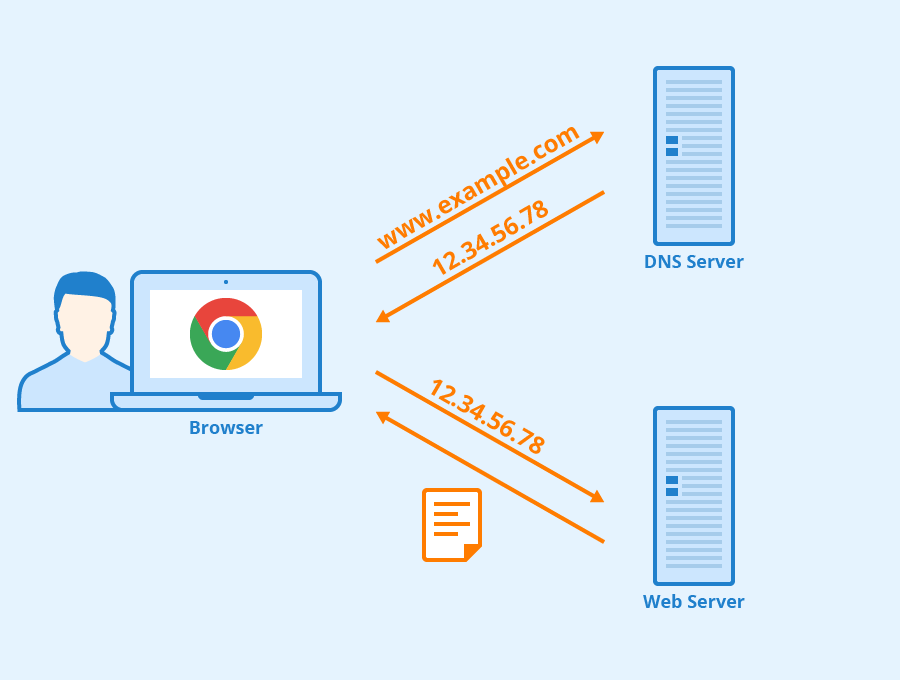
When you type google.com in your browser, your computer doesn’t magically know where it is.
It needs an address — just like you need a house address to visit someone.
That’s where DNS comes in.
What is DNS? (Very simple)
DNS is the phonebook of the internet.
You remember names like
example.comComputers understand numbers like
142.250.190.14
DNS connects the name to the number.
What is DNS? (Very simple)
DNS is the phonebook of the internet.
You remember names like
example.comComputers understand numbers like
142.250.190.14
DNS connects the name to the number.
Why do we need DNS records?
A domain name needs different instructions:
Where the website is hosted
Who handles email
Which service owns the domain
Extra verification info
Each instruction is stored as a DNS record.
NS Record – Who is responsible for this domain?
NS (Name Server) records decide who controls the domain’s DNS.
They answer:
“Which DNS service should be trusted for this domain?”
ns1.hostinger.com
ns2.hostinger.com
If NS records point to Hostinger, Hostinger manages all other records.

A Record Domain - IPv4 address
A record connects a domain to a server IP (IPv4).
Eg:
example.com → 93.184.216.34
This is how browsers reach your website server.

AAAA Record – Domain → IPv6 address
Same as an A record, but for IPv6 (newer IP format).
Eg:
example.com → 2606:2800:220:1:248:1893:25c8:1946
Not mandatory, but good to have if your server supports IPv6.
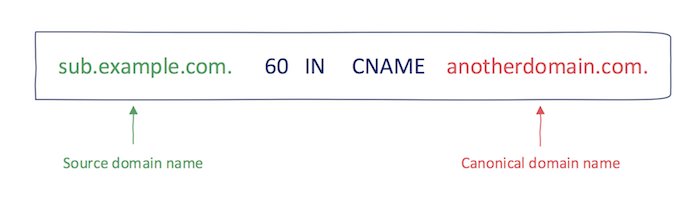
CNAME Record – One name pointing to another name
CNAME is an alias.
Instead of pointing to an IP, it points to another domain.
Eg:
www.example.com → example.com
So you don’t manage multiple IPs.
A record → IP address
CNAME → another domain name
MX Record – How emails find your mail server
MX (Mail Exchange) records tell emails where to go.
When someone emails you@example.com, MX records guide the email to the correct mail server.
Eg:
example.com → mail.google.com
NS = who controls DNS
MX = who receives email

TXT Record - Extra information & verification
TXT records store plain text instructions.
Used for:
Domain verification
Email security (SPF, DKIM)
Ownership proof
Example:
"v=spf1 include:_spf.google.com ~all"
You usually don’t “use” TXT records directly — services ask you to add them.
How all DNS records work together (one website example)
For a simple website:
NS → DNS provider
A / AAAA → Website server
CNAME →
wwwhandlingMX → Email service
TXT → Verification & security
All records work silently in the background — fast and invisible.
