Inside Git: How It Works and the Role of the .git Folder
How Git Works Internally
Git works internally by storing project snapshots in a hidden .git folder using simple data chunks called objects.
Core Layers
Your files sit in the working directory, changes go to the staging area (index), and commits save full snapshots to the repository. This three-layer setup lets you prepare changes before locking them in. Hashes (SHA-1 codes) name each piece uniquely from its content.
Key Objects
• Blob: Raw file data, no path or name.
• Tree: Maps folders and files to their blobs or sub-trees.
• Commit: Links a tree snapshot, parents, author, date, and message.
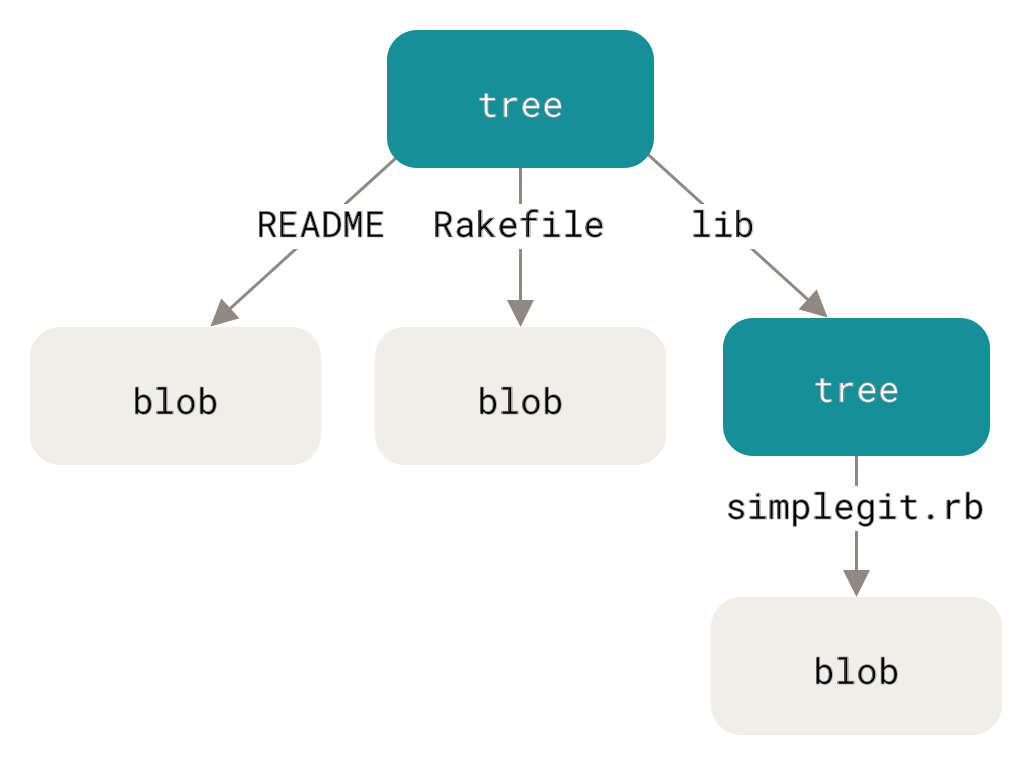
These form chains; identical content reuses the same hash for efficiency.
git add Step
Git hashes changed files into blobs and updates the index with paths and hashes. Staging prepares a clean snapshot without altering your work files.
git commit Step
From the index, Git builds trees, creates a commit object, and points your branch (via refs/) to its hash. History grows as a chain or branches, all verified by hashes.
Simple Model
Picture a chain of photo albums (commits) where each photo (tree) shows folder layouts of pictures (blobs). Edit a picture? New hash ripples up, creating a fresh album. Branches are just labels sliding along the chain.
Understanding the .git Folder
The .git folder is Git’s hidden storage for all project history and data. It keeps your work safe without cluttering files.
Why It Exists
Git uses .git to track every change, store commits, and manage branches. Delete it, and your project loses all version history.
Main Parts Inside
• objects/: Packed files, folders, and commits as hashed data.
• refs/: Points to branches and tags.
• index: Staging area for git add.
• HEAD: Current branch or commit.
• config: Repo settings.
